How do I create waypoints when planning a tour?
When planning a tour, each click or tap on the map sets a point. The first point is always your starting point (A). When you set the next point, it becomes your destination point (B). If you set another point after that, you’ve set a new goal.
The previous destination then becomes a waypoint (waypoints are represented without a letter).
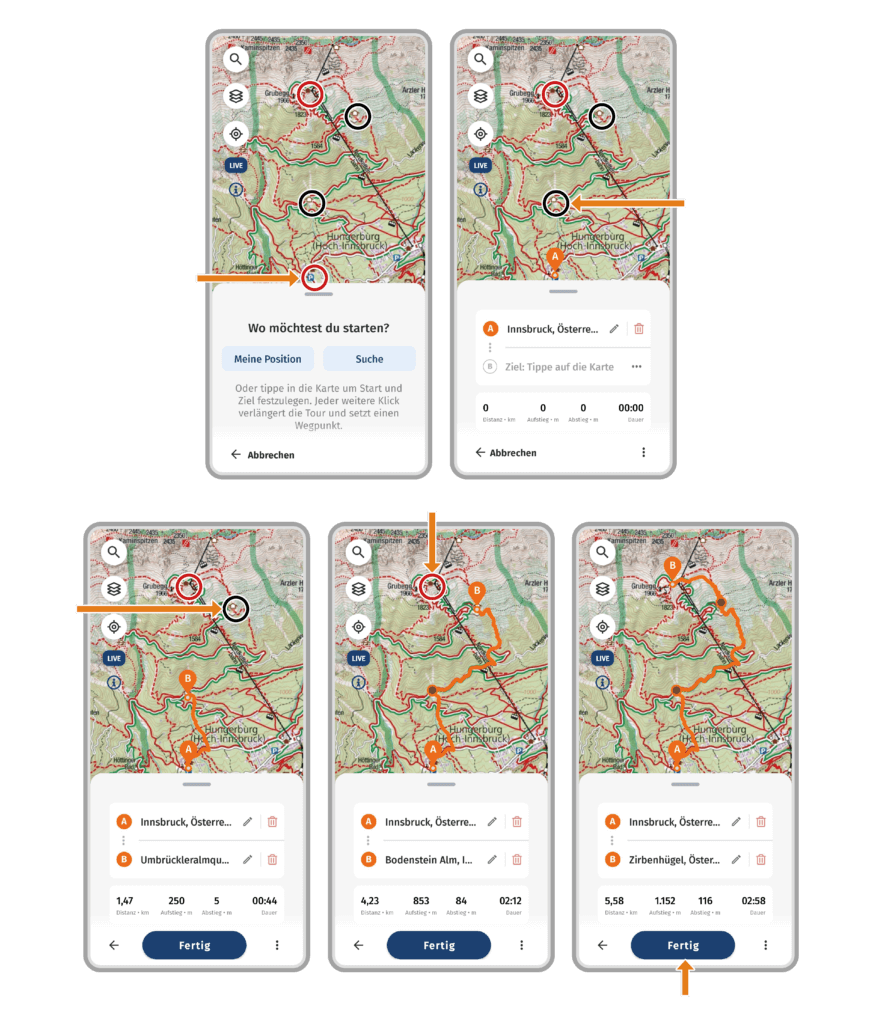
Here’s an example of a tour where we’ll use waypoints:
We are planning a tour from the Hungerburg parking lot to Seegrube (red circles). On our hike we want to head for two stops as waypoints (black circles).
- Click on the parking lot = Starting point (A).
- Click on the first stop = Waypoint 1 (This point is now displayed as the destination. Once we set another point, it becomes a waypoint).
- Click on the second stop = Waypoint 2.
- Click on Seegrube = Destination point (B).
Now we’ve planned a tour from the parking lot Hungerburg to Seegrube, with two stops as waypoints.
 0
0
 0
0